
enumeration Management
Feature overview
Purpose
Enumeration management maintains platform-level shared enumeration types and enumeration items, providing unified optional values for status, category and other fields. First define the enumeration type, and then maintain labels and key values for this type. Subsequent Business Data Types and modeling can reference these definitions.
In practice: Organize the contents of "can only choose from several fixed options" into a public option table, such as "normal, disabled" of user status.
Main features
- Types and values are maintained separately: Type is used for classification, and enumeration data is used to define labels, key values, and sequences.
- Platform-level reuse: enumeration created in Basic Management can be used as a public definition of the platform, which is different from enumeration in the project.
- Status and uniqueness control: Type and enumeration items maintain normal/disabled status respectively, and key values under the same type cannot be repeated.
Scope
This page is for platform-level enumeration management. The enumeration type and enumeration data are controlled by operation permissions respectively; being able to see the type list does not mean that the enumeration data can be entered or maintained. The project-specific enumeration is maintained in [Semantic Assets] of [Ontology Modeling].
Before you begin
Prerequisites
- The menu and corresponding operation permissions managed by enumeration have been obtained.
- The enumeration name, type code and business meaning of each option have been clarified.
- Before adding a new enumeration item, first create the corresponding enumeration type.
Navigation path
【Basic Management】 > 【enumeration Management】
Page overview
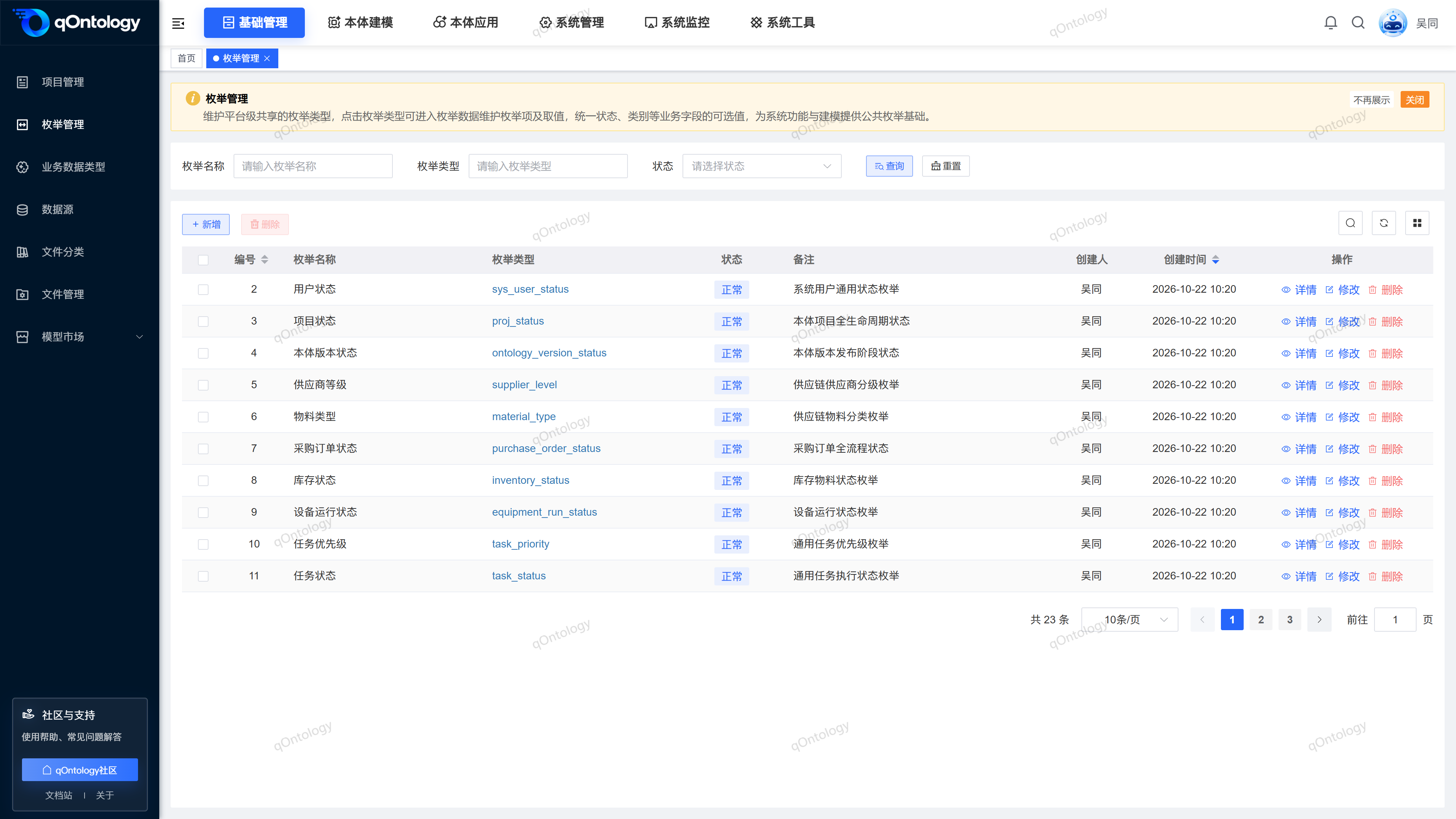
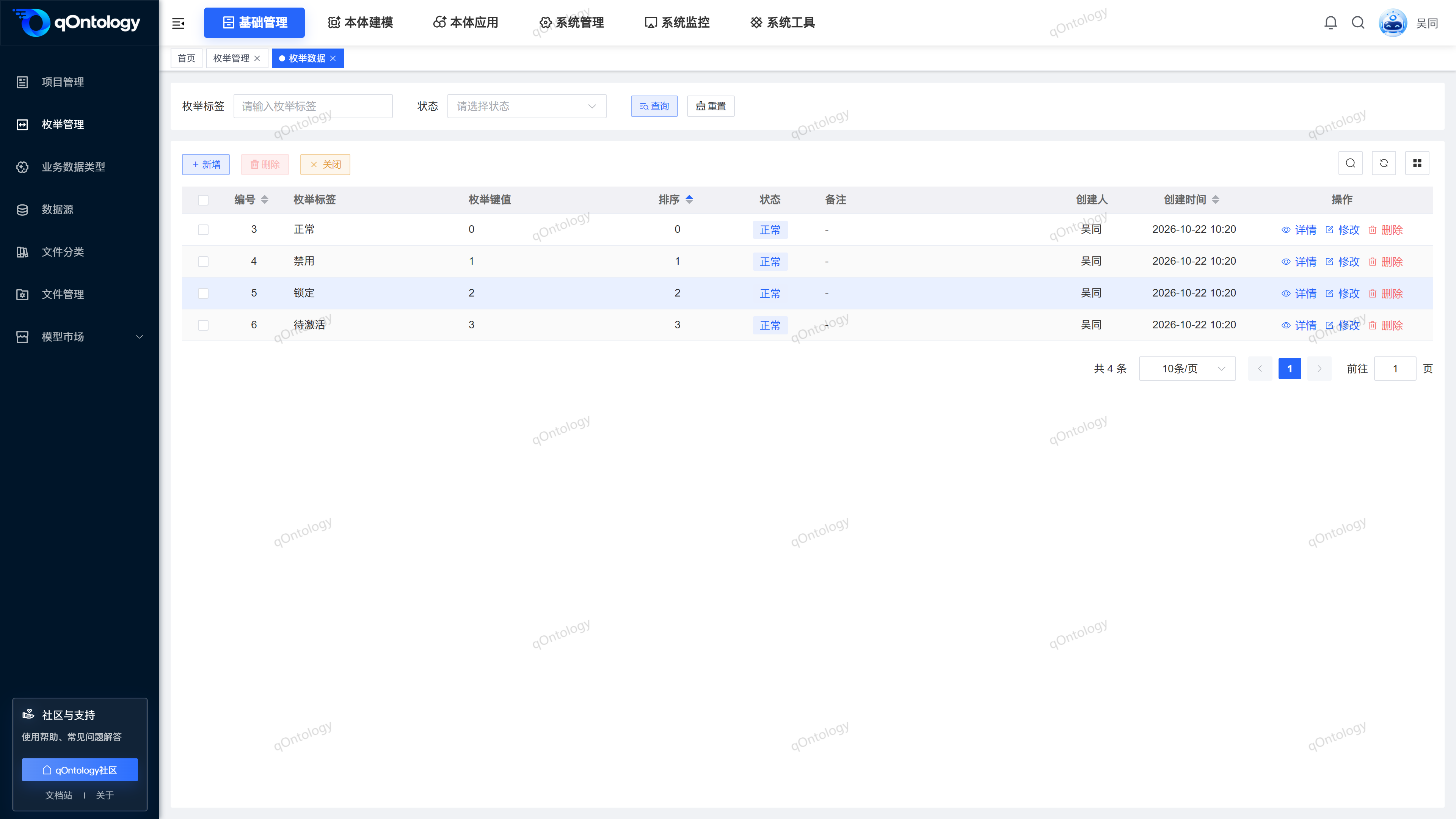
The type list supports querying by [enumeration Name] [enumeration Type] [Status]. The enumeration type code in the list is the entrance to the enumeration data; the enumeration data page supports querying by [enumeration label] and [Status], and provides new, details, modification, deletion and closing entrances.
Recommended workflow
Define type coding → Add enumeration type → Click type coding → Maintain enumeration items → Check labels, key values and status → Reference in business type or modeling.
Functional operation instructions
Query enumeration type
- Fill in the enumeration name or enumeration type in the query area.
- Select [Status] as needed.
- Click [Query].
- Click [Reset] when you need to clear the filter.
Result: The list displays the enumeration types that meet the conditions.
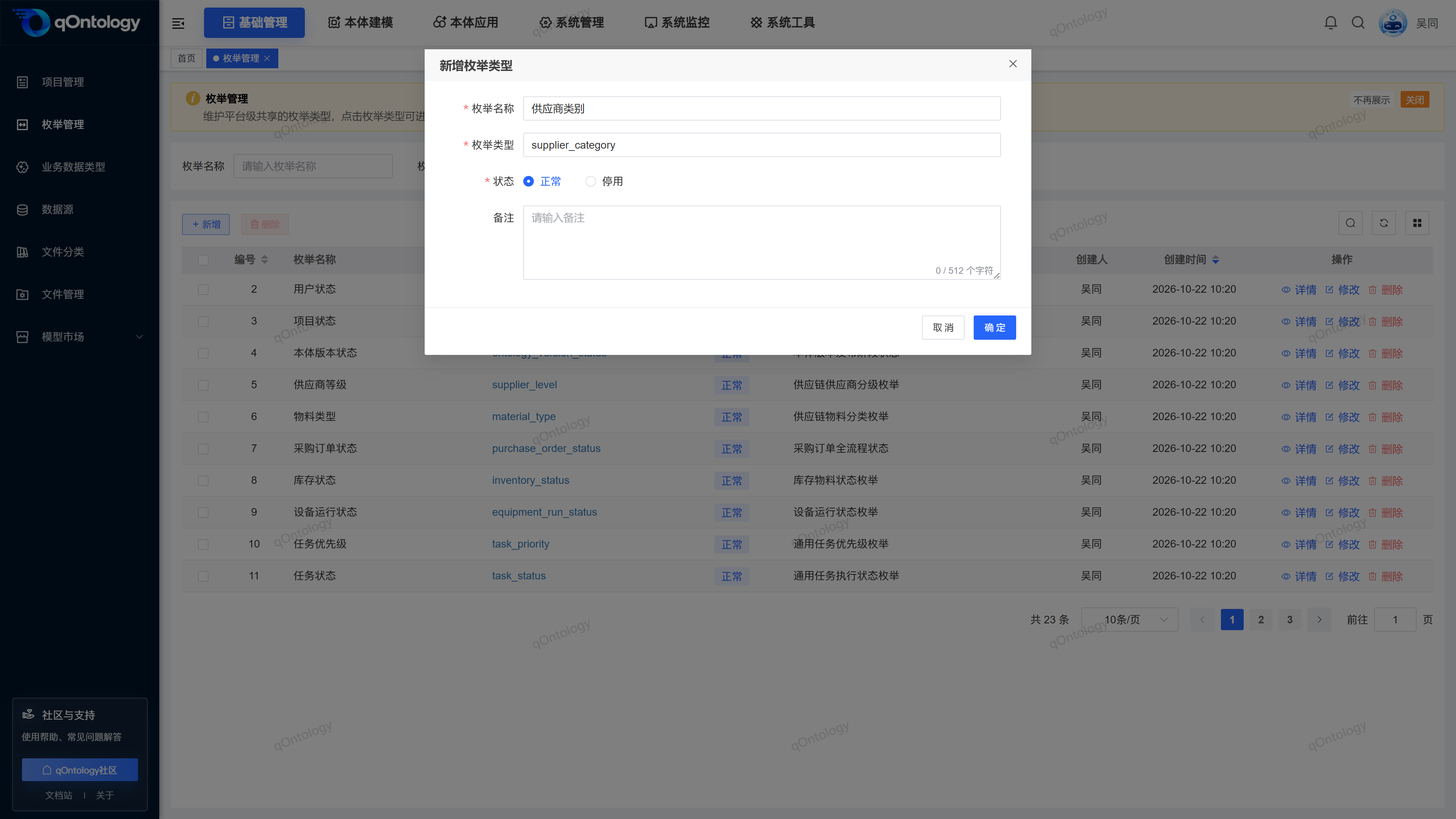
Added enumeration type
- Click [Add].
- Fill in the enumeration name and enumeration type code.
- Select [Status].
- Fill in [Remarks] as needed.
- Click [OK].
- enumeration Name: A name that is easy for business personnel to understand, no more than 128 characters. (required)
- enumeration type: unique type code, starting with a letter, only letters, numbers, and underscores allowed, no more than 128 characters. (required)
- Status: Select [Normal] or [Disabled]. (required)
- Note: Supplement the purpose of this type, no more than 512 characters. (optional)
Result: "Added successfully" is displayed, and the type list is refreshed.
View and modify enumeration type
- When viewing information, click [Details] on the target row.
- After closing the details, click [Modify] on the row if adjustments are needed.
- Modify content that is allowed to be edited, such as name, status, or notes.
- Click [OK].
Result: After "Modification Successful" is displayed, the list is updated.
type encoding
The type code cannot be modified for a type that already has enumeration data. Modifying the state is a different operation from deleting it. Do not replace state maintenance by deleting and rebuilding.
Enter enumeration data
- Click the enumeration type encoding of the target row, such as sys_user_status.
- View the tags, key values, sorting and status under this type.
- Fill in the [enumeration label] as needed or select [Status].
- Click [Query].
Result: Enter the enumeration data list of the target type; [Close] is used for return type management.
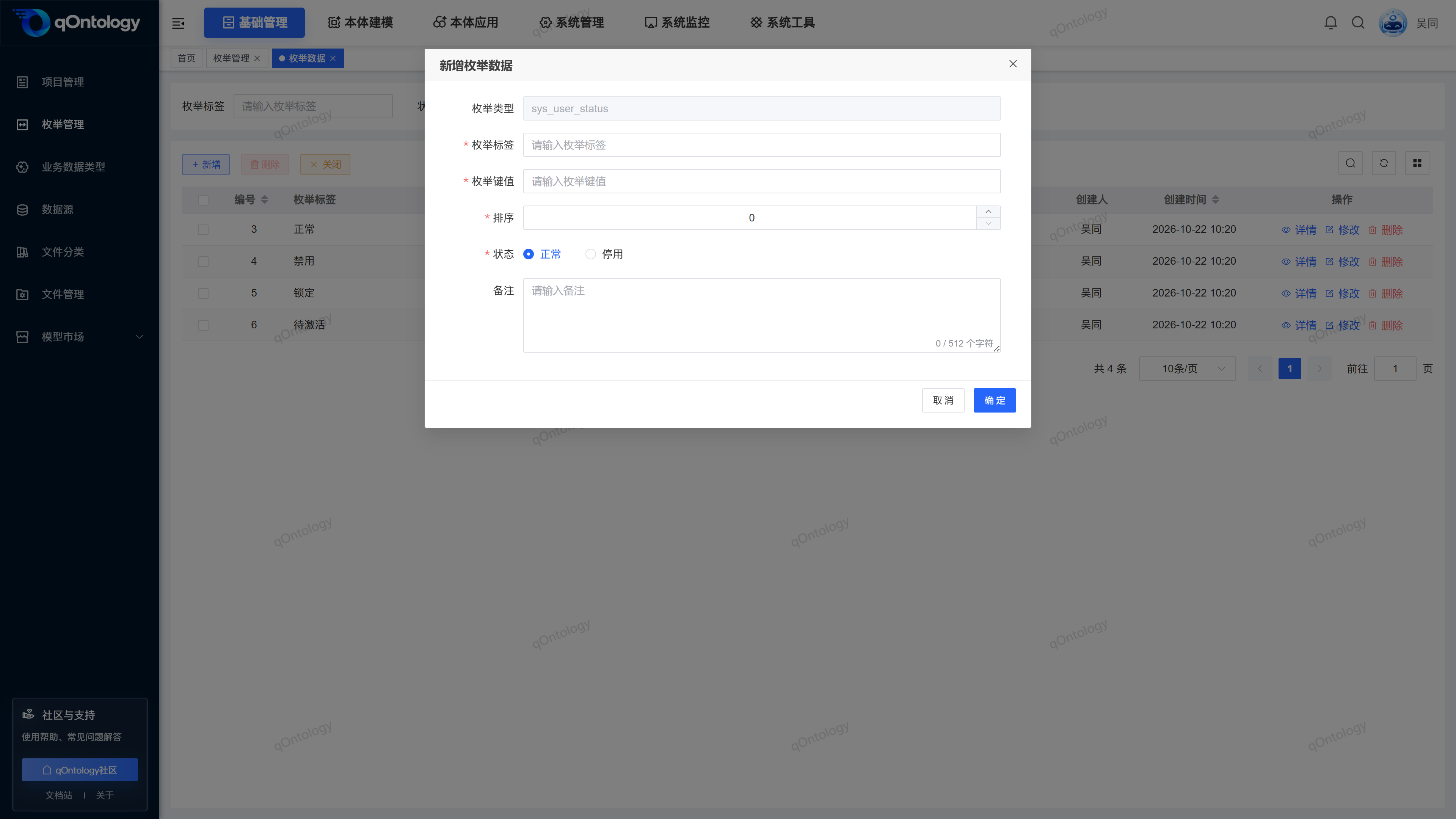
Added item enumeration
- Click [Add] on the enumeration data page.
- Check the automatically displayed and non-editable [enumeration type].
- Fill in the [enumeration label].
- Fill in the [enumeration key value].
- Set [Sort].
- Select [Status].
- Fill in [Remarks] as needed.
- Click [OK].
Result: "Added successfully" is displayed, and the enumeration item appears in the current type of data list.
| Field name | illustrate | Is it required? |
|---|---|---|
| enumeration type | It is automatically brought in by the current type and cannot be changed manually. | automatically brought in |
| enumeration tag | User-interpretable option text, no longer than 128 characters. | yes |
| enumeration key value | The actual value of the corresponding option must not be repeated in the same type and must not exceed 128 characters. | yes |
| sort | A non-negative integer used to express the display order. | yes |
| state | Normal or disabled. | yes |
| Remark | Additional description, no more than 512 characters. | no |
Modify or delete the enumeration item
- When you need to view it, click [Details] in the enumeration item row.
- When adjustments are needed, click [Modify] on the row.
- After modifying labels, key values, sorting, status or comments, click [OK].
- When you need to delete, click [Delete] on the target row, or check multiple items and click [Delete] above.
- Check the confirmation prompt and confirm the deletion.
Result: Update the item after the modification is successful; refresh the current enumeration data list after the deletion is successful. The enumeration type cannot be changed when modifying the enumeration item.
Delete enumeration type
- First check whether the target type still has enumeration data and business purposes.
- Click [Delete] in the type row, or check multiple types and click [Delete] above.
- Check the confirmation prompt and confirm the deletion.
Result: When the type still has enumeration data, the system prompts you to delete the data first; if it is referenced by Model Axioms, you need to unbind the corresponding axiom first. After the deletion conditions are met, "Deletion Successful" is displayed and the list is refreshed. If any type of batch deletion does not meet the conditions, the deletion will be rejected.
FAQ
**What is the difference between enumeration name and enumeration type?**The
enumeration name is the business-oriented name, and the enumeration type is the encoding used to distinguish this group of options.**Why can't I modify the type encoding or delete the type?**The type code cannot be modified when
already has enumeration data; the enumeration data under it needs to be processed before deleting the type.Can duplicate key values be used under the same type?
cannot. The key value must be unique under the same type. If it is repeated, it will prompt that the key value already exists.Why is type enumeration not a clickable link?
also needs corresponding permissions to access enumeration data. Please contact the administrator to check the access permissions of enumeration data.
Summarize
Maintain types first, then labels and key values. For enumeration that has been referenced by the business, the meaning of the value should be checked before modification to avoid mixing the display name and the actual key value.