
Business Data Types
Feature overview
Purpose
On top of basic types such as text, integer, and decimal, Business Data Types supplements the business name, description, and necessary parameters to form a public type that can be referenced by the Object Types attribute. It solves the problem of inconsistent meanings, units or value conventions of the same business field in different locations.
In practice: Define "what data is this and how to express it" in advance, such as decimal "weight" with unit, and subsequent attributes can be directly referenced.
Main features
- Six types of basic types: Support text, integer, decimal, Boolean, date, enumeration.
- Add parameters by type: Configure units for integers and decimals, configure decimal places for decimals, configure formats for dates, and enumeration is associated with the enumeration type.
- Public business definition: The types in Basic Management can be referenced in modeling; project-specific types are maintained within the project.
Scope
This page maintains platform level Business Data Types. Addition, details, modification and deletion are controlled by corresponding permissions. When selecting enumeration on this page, use the platform enumeration, and do not select the project-specific enumeration. The description of the type is a business description, and the natural language in it cannot be directly regarded as an effective verification rule.
Before you begin
Prerequisites
- The access and related operation permissions of Business Data Types have been obtained.
- The business field name, basic data type and business meaning have been clarified.
- If you select the enumeration type, first maintain the public enumeration in [enumeration Management].
Navigation path
【Basic Management】 > 【Business Data Types】
Page overview
Press [Name] and [data type] to query at the top, and the name, description, basic data type, creator and creation time are displayed below. Each row provides [Details] [Modify] [Delete], and the top of the list supports adding and batch deletion after checking.
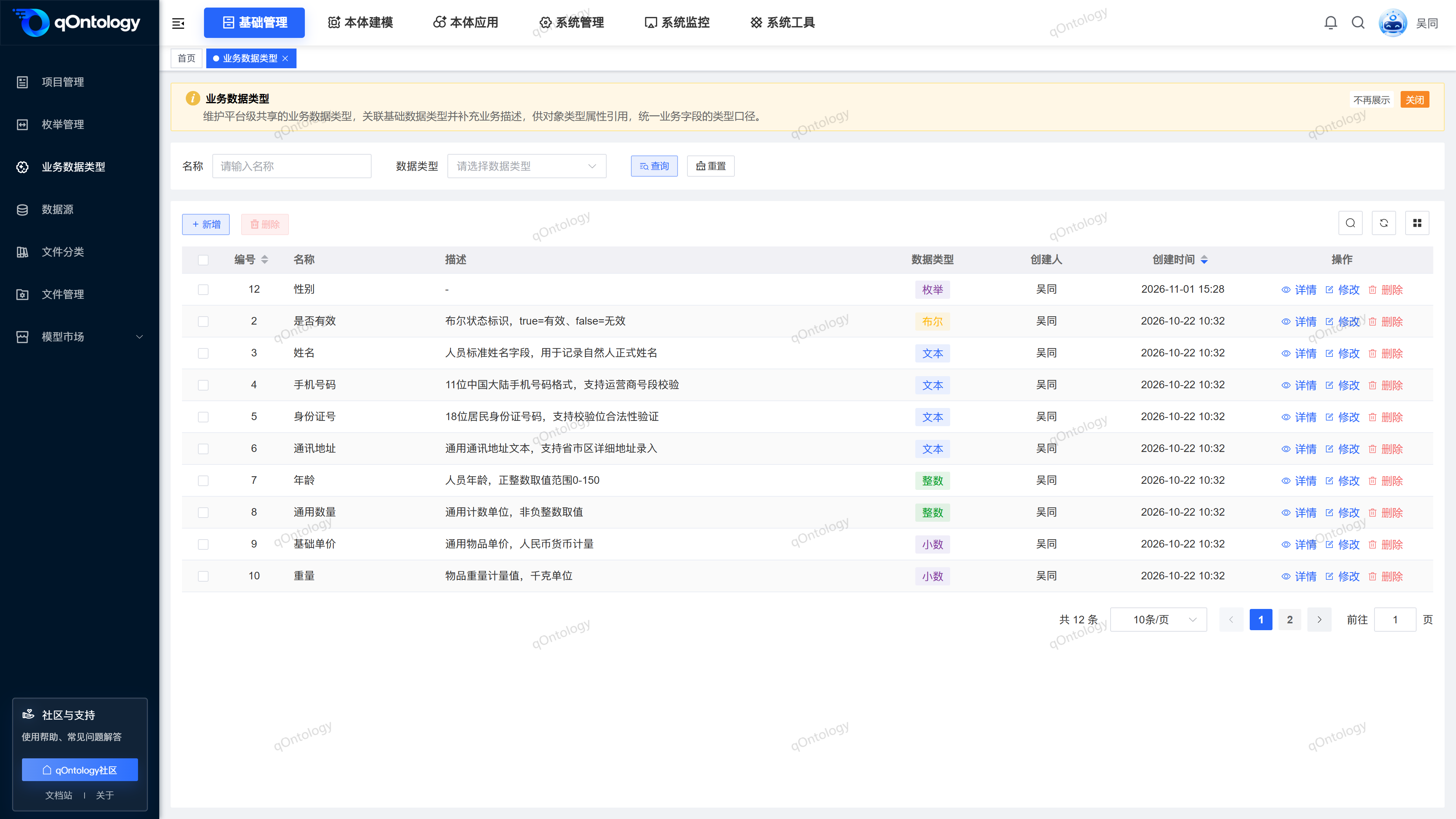
Recommended workflow
Clarify the business meaning → Select the basic type → Fill in the linkage parameters → Save → Reference in the Object Types attribute.
Functional operation instructions
Query and view details
- Fill in [Name], or select [data type].
- Click [Query].
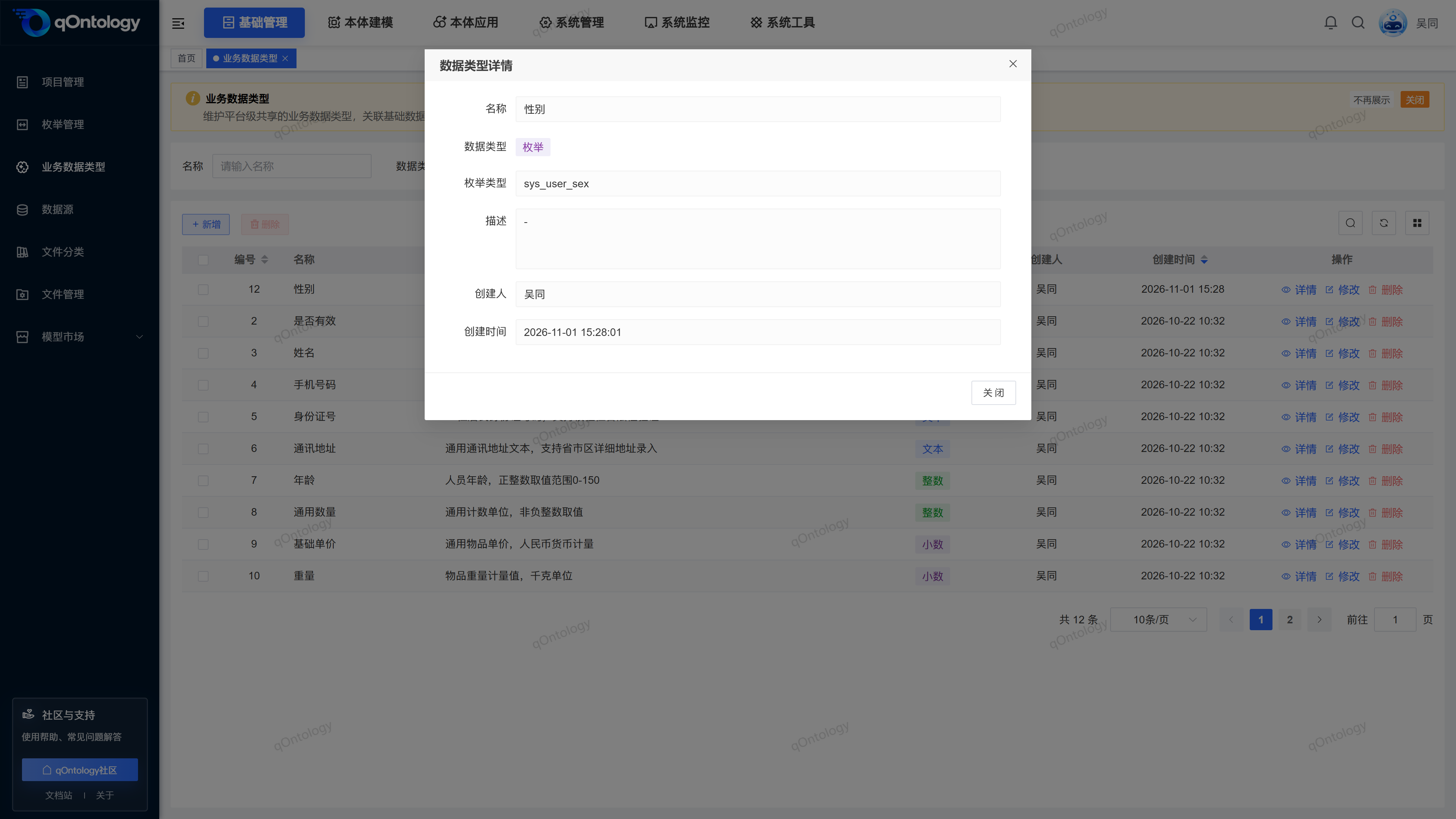
- Click [Details] on the target row.
- View the name, type parameters, description and creation information of the type.
- Click [Close] to return to the list.
Result: Details display the fields corresponding to this type in read-only mode; click [Reset] to restore the filtering conditions.
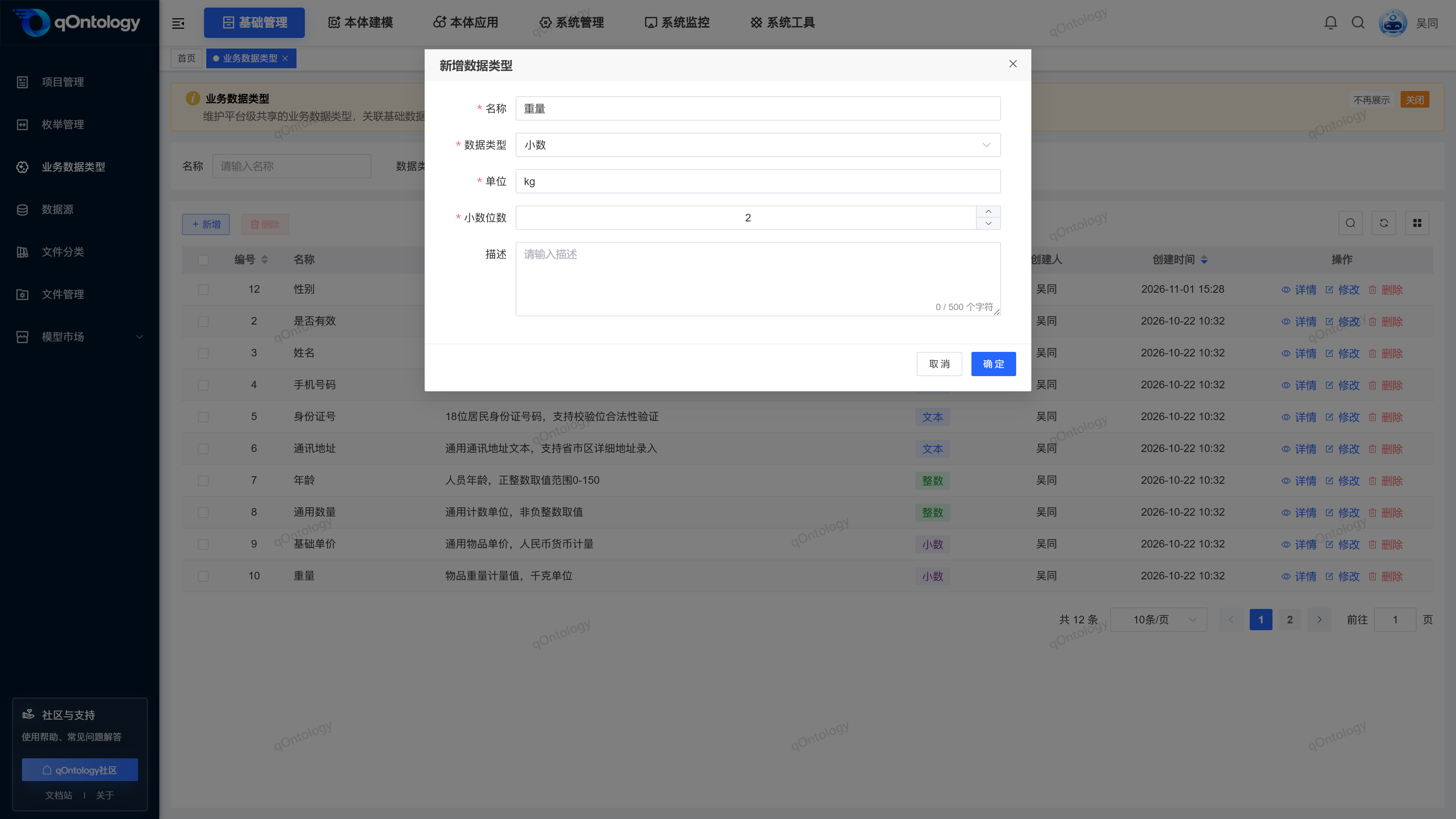
Added Business Data Types
- Click [Add].
- Fill in [name].
- Select [data type].
- Supplement the parameters in the table below according to the selected type.
- Fill in the [Description] as required.
- Click [OK].
| Field name | illustrate | Is it required? |
|---|---|---|
| name | Fill in the business name; for example, "Weight" and "Is it valid?" | yes |
| data type | Text, integer, decimal, Boolean, date or enumeration. | yes |
| unit | Fill in when selecting integers or decimals, such as kg, pieces. | Required for integers/decimals |
| Decimal places | When selecting a decimal, fill in a non-negative integer. | Required when decimal |
| Format | When selecting a date, fill in the date format, such as yyyy-MM-dd HH:mm:ss. | Date is required |
| enumeration type | When selecting enumeration, select from platform enumeration. | Required when enumeration |
| describe | Briefly describe the business meaning; it is recommended to limit it to 200 characters. | no |
Result: After "Add successfully" is displayed, the pop-up window closes and the list is refreshed with the newly added record.
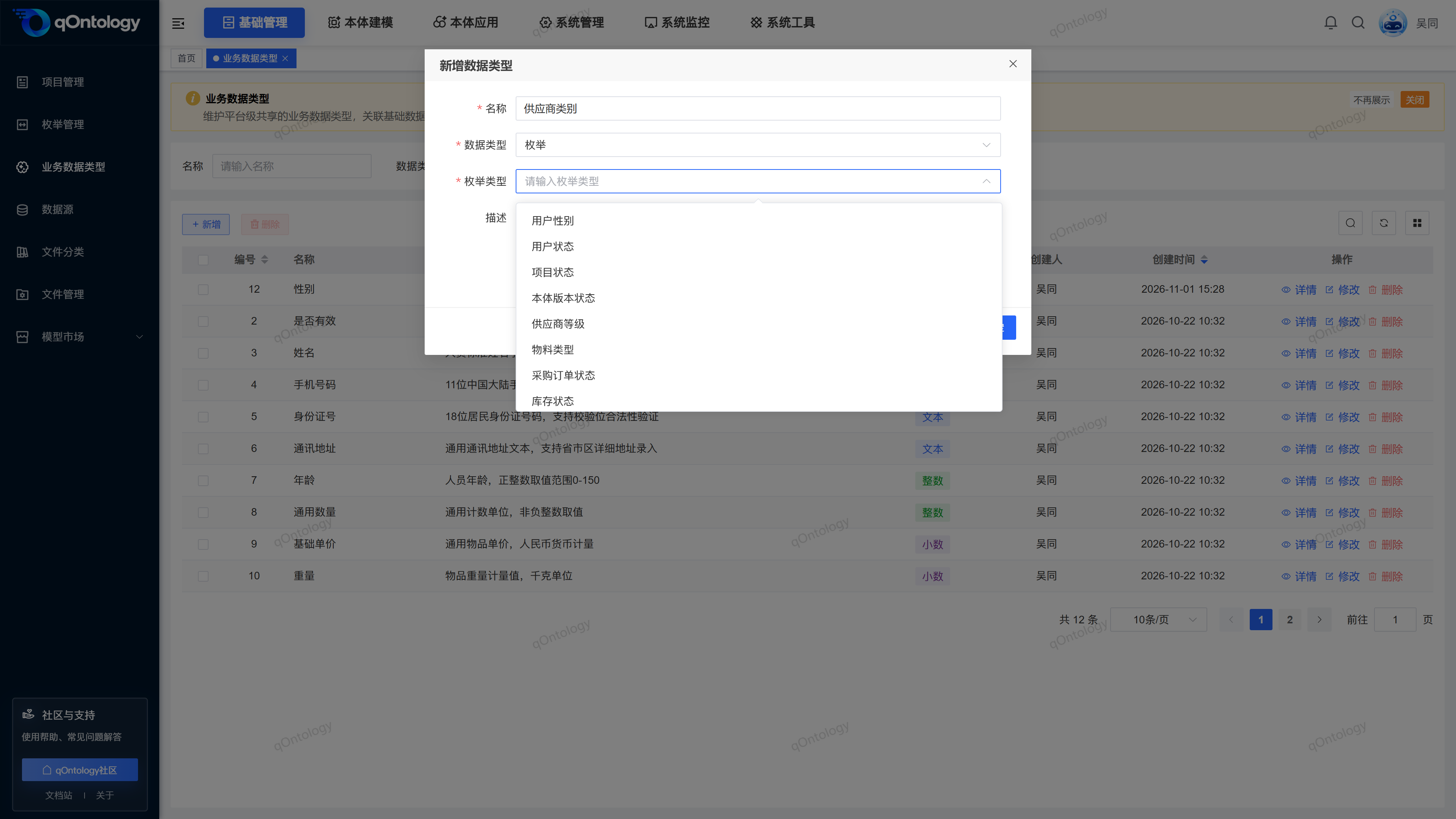
Configure different base types
- Text or Boolean type: fill in name and description.
- Integer type: fill in [Unit].
- Decimal type: fill in [unit] and set [number of decimal places].
- Date type: Fill in the date expression format in [Format].
- enumeration type: Select the maintained public enumeration in [enumeration type].
Result: When selecting different types, the form displays corresponding parameters; before saving, you should check the currently displayed required items.
The above are different types of filling scenarios. Just complete one of them according to the currently selected type.
Modify Business Data Types
- Click [Modify] on the target row.
- Adjust the business name, type or corresponding parameters.
- Click [OK].
Result: Display "Modification Successful" and refresh the list.
You should check where this type is used before modifying it. After switching the base type, recheck the linkage parameters to avoid inheriting the unit or format meaning of the original type.
Delete Business Data Types
- When deleting a single record, click [Delete] on the target row; when deleting in batches, first check the records and then click [Delete] above the list.
- Check the target record in the confirmation prompt.
- Confirm deletion.
Result: Refresh the list after "Delete Successfully" is displayed. Before deleting, you should confirm that the public definition is no longer needed; if it is prompted to be referenced by Model Axioms, first unbind the corresponding axiom, and then delete the type. When there are referenced items in the batch deletion, the deletion will be rejected.
FAQ
Why are there no input boxes for units, decimal places or format?
These fields are displayed by basic type: integers and decimals display units, decimals display decimal places, date display format, enumeration displays enumeration type.Will the type here automatically become a project-specific type?
will not. This page maintains public types; types within a project are independently maintained by the corresponding project, and modeling attributes can reference public definitions as needed.Will the value be automatically checked if "Age 0-150" is written in the description?
description is used to explain the business meaning. You cannot judge that data verification has been enabled based solely on the range text in the description. Relevant constraints need to be configured according to actual rules.What should I do if the save prompt is too long after entering the description?
Shorten the description and save it again; it is recommended to limit it to 200 characters.
Summarize
Business Data Types should clarify both the business meaning and the basic representation method. Before citing, focus on checking the type, unit, precision, date format or enumeration source.